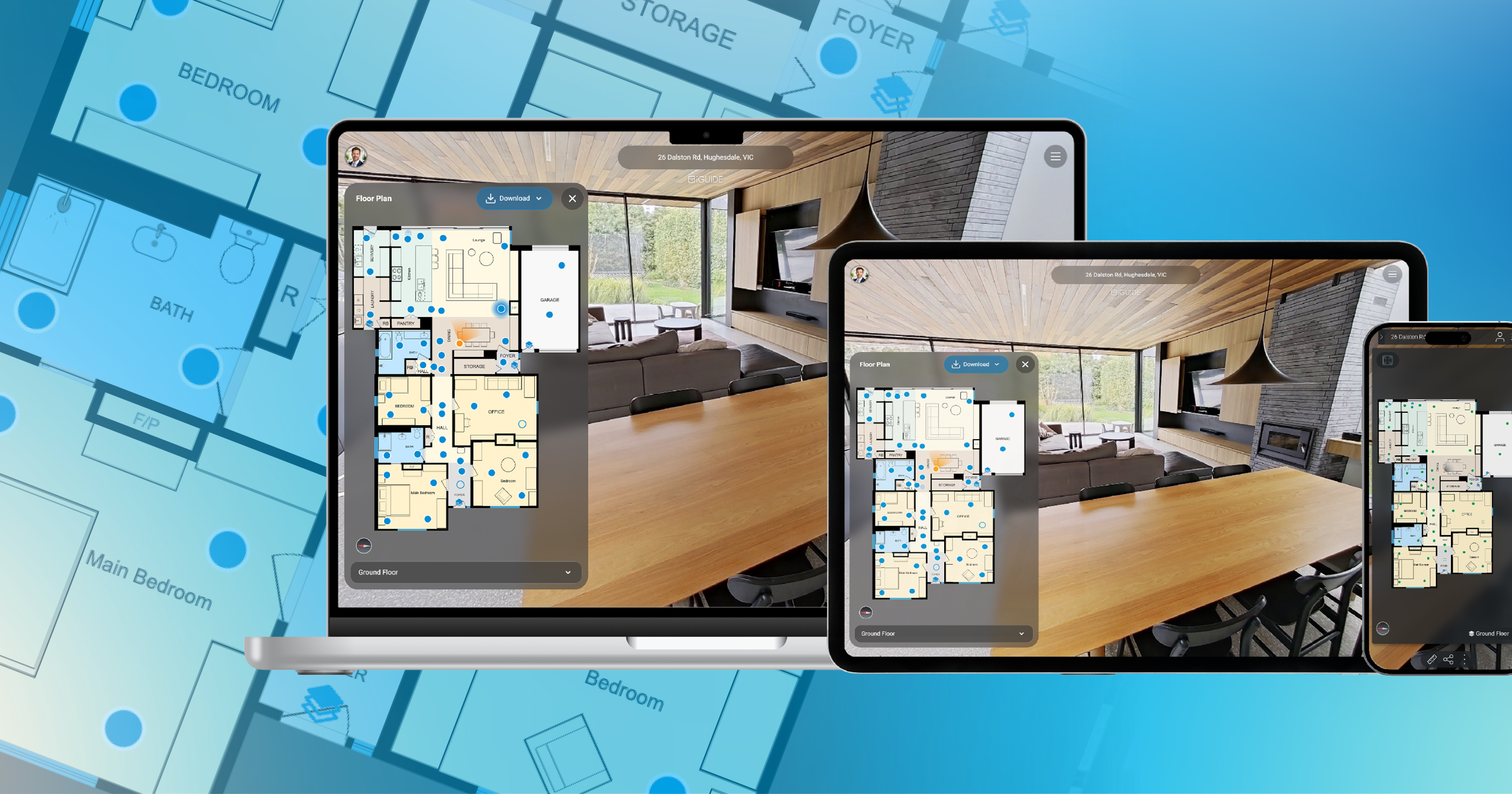
Property browsing habits continue to evolve, especially on mobile devices. The updated Viewer is designed to create a cleaner, easier experience across screen sizes while keeping the focus where it belongs: on exploring the property.
The refresh includes:
- Larger and easier-to-use floor plan panels
- More space dedicated to the tour itself
- Cleaner navigation with less on-screen clutter
- A layout that adapts more naturally across devices
The goal wasn't to change how iGUIDE works. It was to make the experience feel more intuitive.
What's changing in the iGUIDE Viewer experience
Easier-to-use floor plans across devices
The floor plan experience has been simplified and made easier to interact with.
Updates include:
- Expand and collapse options for floor plans
- Full-screen floor plan overlays
- Larger navigation targets
- Download controls that are easier to find
Instead of hunting through multiple locations, floor plan downloads now appear directly within the full-screen floor plan experience.
A cleaner layout with more focus on the property
The Viewer layout has been streamlined to reduce visual clutter and create a more immersive viewing experience.
Navigation tools now live within the menu in the top-right corner, creating a cleaner interface while keeping commonly used tools easy to access.
The result is more room dedicated to exploring the property itself.
A more polished presentation for agent branding
The updated Viewer also creates a cleaner presentation for agent branding.
Agent headshots now appear directly in the Viewer, replacing the generic profile icon and making agent branding more visible within the listing experience.

What stays the same in the iGUIDE Viewer
While the Viewer looks different, the core experience remains familiar.
You can still expect:
- The same 3D tour experience
- Existing links and embeds to continue working
- Floor plan downloads and measurements
- Existing workflows and settings
No action required. The goal was not to change the workflow, but to make it easier to use.
When the updated Viewer will be available
The refreshed iGUIDE Viewer will roll out automatically to the iGUIDE Essentials Portal (Global + Australia). iGUIDE Enterprise Portals are to follow. No updates or setup changes are required on your end. Open an iGUIDE and you'll see the new experience automatically.
Author

Mathushan Gnanasegaram
Product Marketing Manager
Mathushan is the Product Marketing Manager at Planitar, makers of iGUIDE, where he partners closely with product, sales and customer success to bring new features to market. His work focuses on positioning, launch strategy and making sure customers understand the value of what's shipping.
Frequently asked questions
If your iGUIDE Viewer looks different, that's expected. We've refreshed the iGUIDE Viewer with a cleaner design, updated navigation and a more intuitive experience across mobile and desktop. The core tour experience and functionality remain the same. Looking for step-by-step instructions? Visit our updated help article for a closer look at Viewer navigation and settings.
No. You do not need to update anything to use the new iGUIDE Viewer. The update rolls out automatically and your existing links, embeds and workflows continue to work.
If you're wondering where the measurement tool went in the iGUIDE Viewer, it has moved into the menu icon (☰) in the top-right → Tools → Measure in the top-right corner along with other tools and settings.
Yes. You can still download floor plans in the iGUIDE Viewer. Open the floor plan in full-screen mode and select the download button at the top of the panel. Floor plan downloads are also still available through the Details section.
Yes. You can still switch between metric and imperial units in the iGUIDE Viewer. Unit settings are now available under Settings in the menu, while existing unit options remain available in Details.
Yes. The updated iGUIDE Viewer works across mobile, desktop and tablet experiences. The refreshed design adapts more naturally across screen sizes while keeping the same core functionality.