iGUIDE Analytics Overview
Gain in-depth insights into your iGUIDE’s performance by monitoring traffic sources, understanding customer behavior (first-time or returning users) and analyzing browsing duration. These aspects offer a holistic view of iGUIDE accessibility, audience demographics and content placement effectiveness.
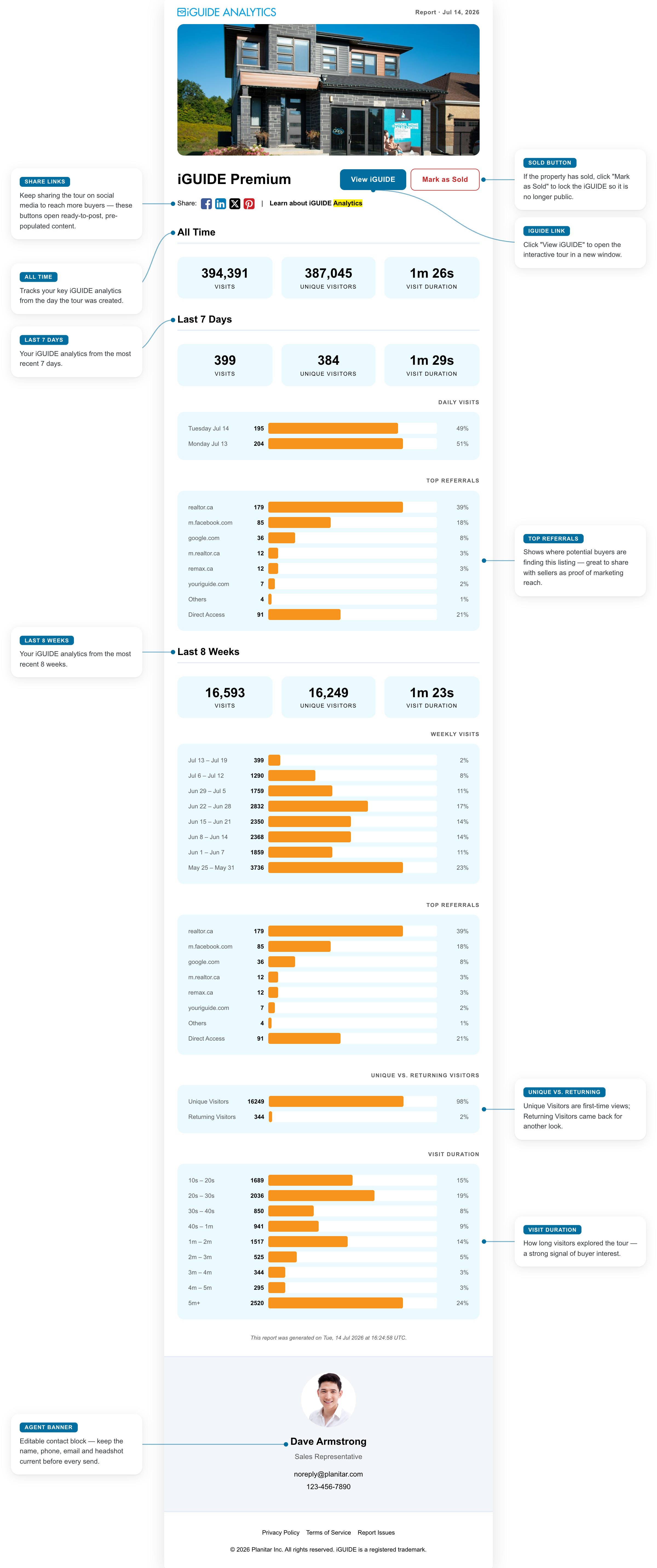






Share Links
Keep sharing the tour on social media to reach more buyers — these buttons open ready-to-post, pre-populated content.
All Time
Tracks your key iGUIDE analytics from the day the tour was created.
Last 7 Days
Your iGUIDE analytics from the most recent 7 days.
Last 8 Weeks
Your iGUIDE analytics from the most recent 8 weeks.
Agent Banner
Editable contact block — keep the name, phone, email and headshot current before every send.
Sold Button
If the property has sold, click "Mark as Sold" to lock the iGUIDE so it is no longer public.
iGUIDE Link
Click "View iGUIDE" to open the interactive tour in a new window.
Top Referrals
Shows where potential buyers are finding this listing — great to share with sellers as proof of marketing reach.
Unique vs. Returning
Unique Visitors are first-time views; Returning Visitors came back for another look.
Visit Duration
How long visitors explored the tour — a strong signal of buyer interest.